


OBDII Protocol Detector OBD2 Break Out Box ECU
ر.ع.40.00
ODIAG GT100 Functions in Detail
– By connecting the vehicle and diagnostic tool via OBDII, Godiag GT100’s LED will indicate whether the OBDII diagnostic interface has a good communication with the car
– Monitor the voltage of vehicle OBDII interface and display it in real time. If it is less than 11V, please stop the diagnosis and programming to avoid the vehicle being unable to start/data loss/module locked.
Indicator Meaning:
| 1. Manufacturer custom 2. SJE1850 wire 3. Manufacturer custom 4. Power grounding 5. Signal grounding 6. SAEJ2284《CAN》high 7. ISO9141-2&iso, DIS4230-4K wire 8. Manufacturer custom |
9. Manufacturer custom 10. SJE1850 wire《bus-> 11. Manufacturer custom 12. Manufacturer custom 13. Manufacturer custom 14. SAEJ2284《CAN》low 15. ISO9141-2 & ISO/DIS 4230-4L wire 16. Car battery positive |
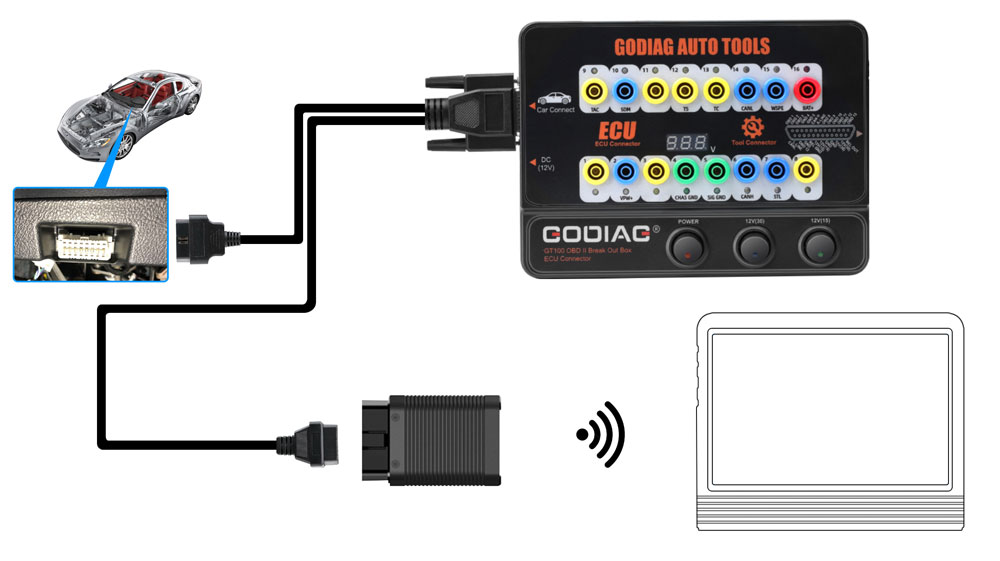
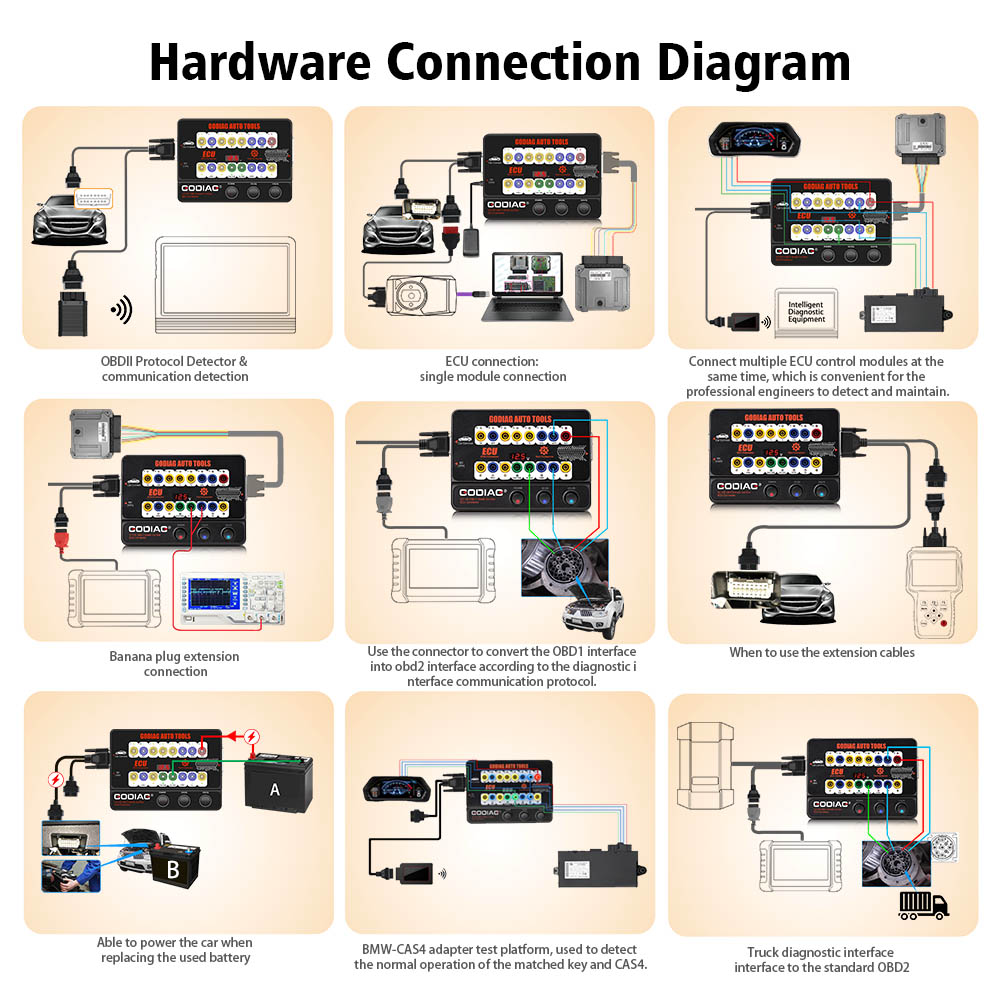
1. OBDII Protocol Detector & communication detection
1) Connect GODIAG GT100 to the OBDII diagnostic port of the car.
2) When the device displays the voltage, turn on the power switch of GODIAG GT100.
3) Then connect to the diagnostic tool, when the tool is communicating with the car, the LED indicator of corresponding protocol will light up or flash. ( If the CAN protocol is detected, it will have the maximum brightness. When the communication is successful, the corresponding CAN-H and CAN-L will dim or twinkling weakly)
2. ECU connection: single module connection
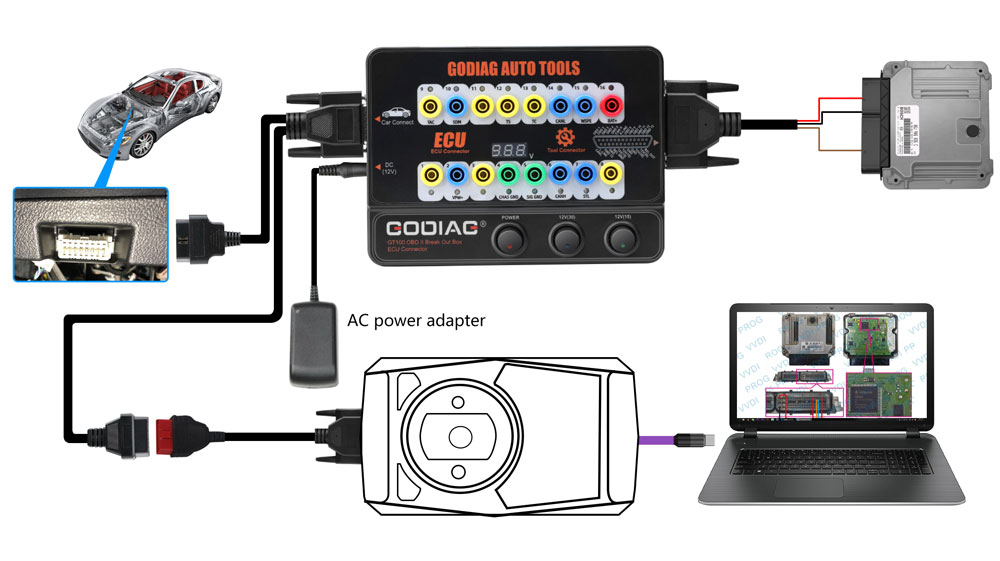
GODIAG GT100, connected to a single ECU module, is convenient for a user to do the single-module diagnosis and programming.
1) Connect the ECU with the color jumpers. (If the ECU is CAN protocol, please check whether you will need to connect a 120 ohm resistor.)
2) The Godiag GT100 can be powered by connecting to the OBDII diagnostic interface of car, or by an AC power adapter.
3) To diagnose and program for a single ECU by connecting the diagnostic tool or ECU programmer.
3. Banana plug extension connection:
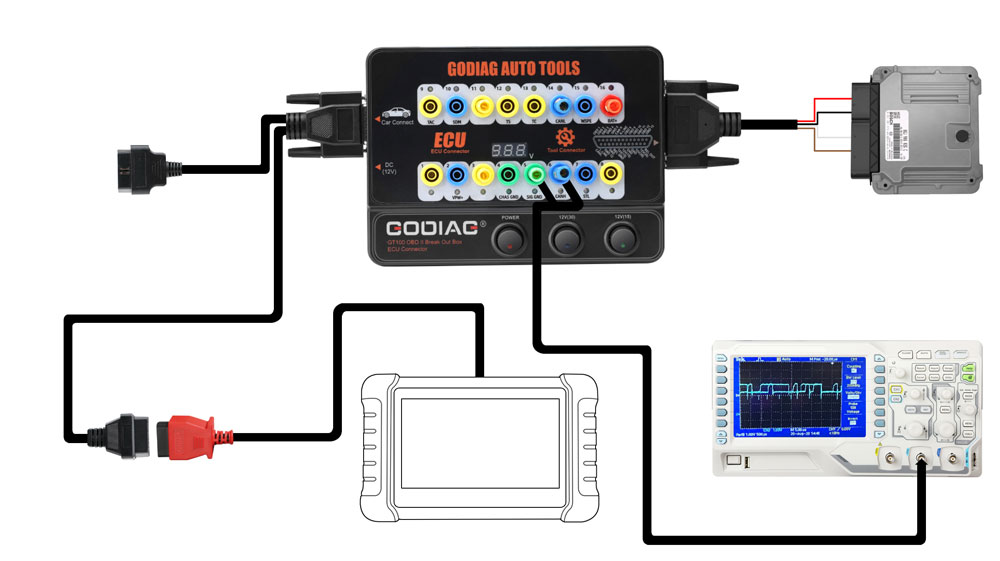
Extend the car’s OBDII 16pin interface to tell you whether the OBDII interface connection is good or not, which is convenient for the test of OBDII interface voltage waveform.
4. Convert OBD1 diagnostic interface to the standard OBD2
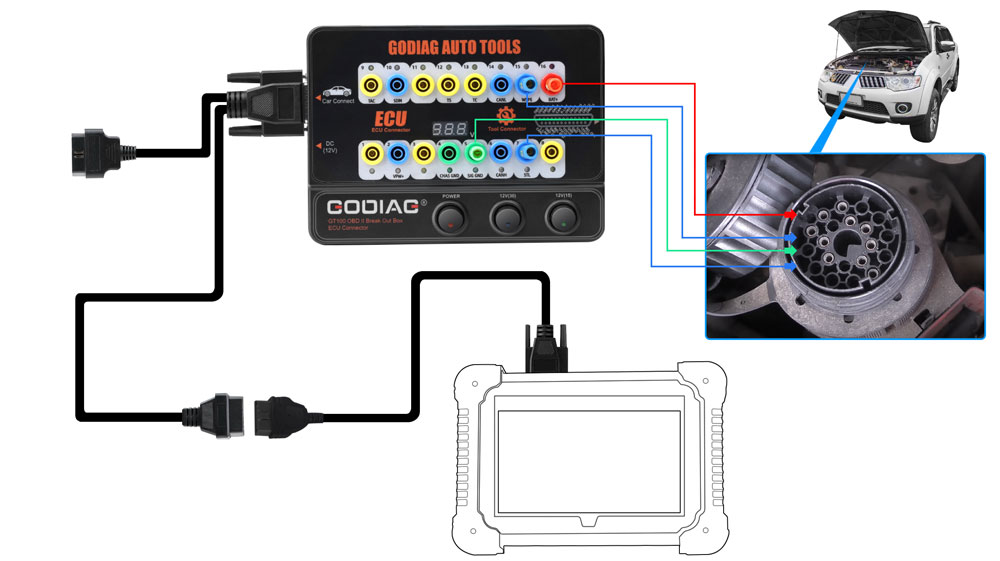
Use the connector to convert the OBD1 interface into obd2 interface according to the diagnostic interface communication protocol.
6. Used as the extension cables: The space of the diagnostic interface location is too narrow to connect to the diagnostic tool, or the user find that the diagnostic cable is not long enough during maintenance. It can be extended by 1.2 meters.
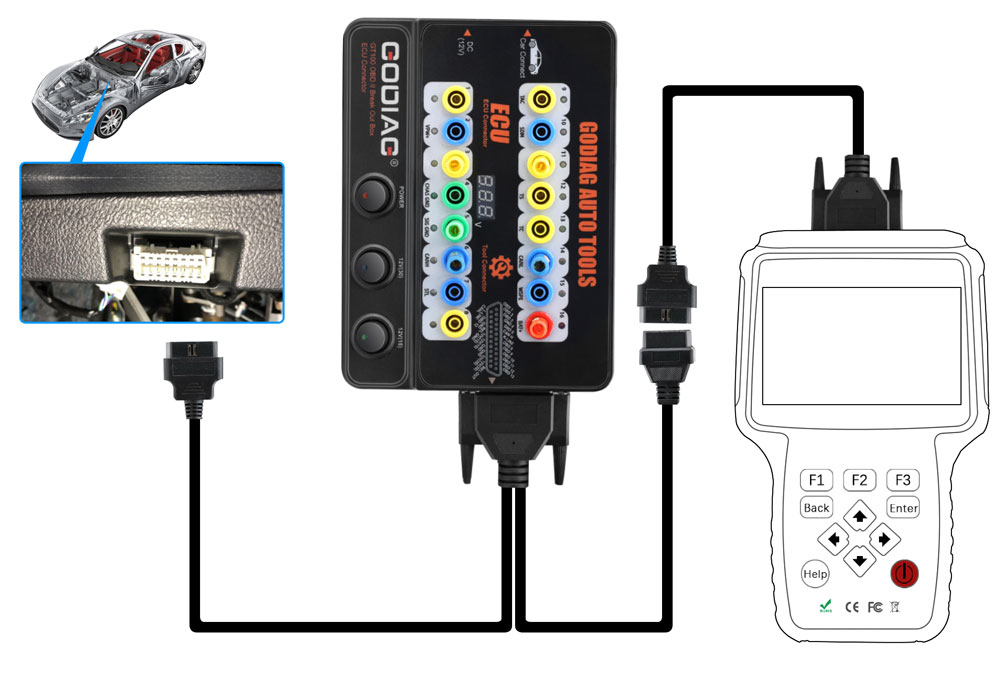
7. Able to power the car when replacing the used battery.
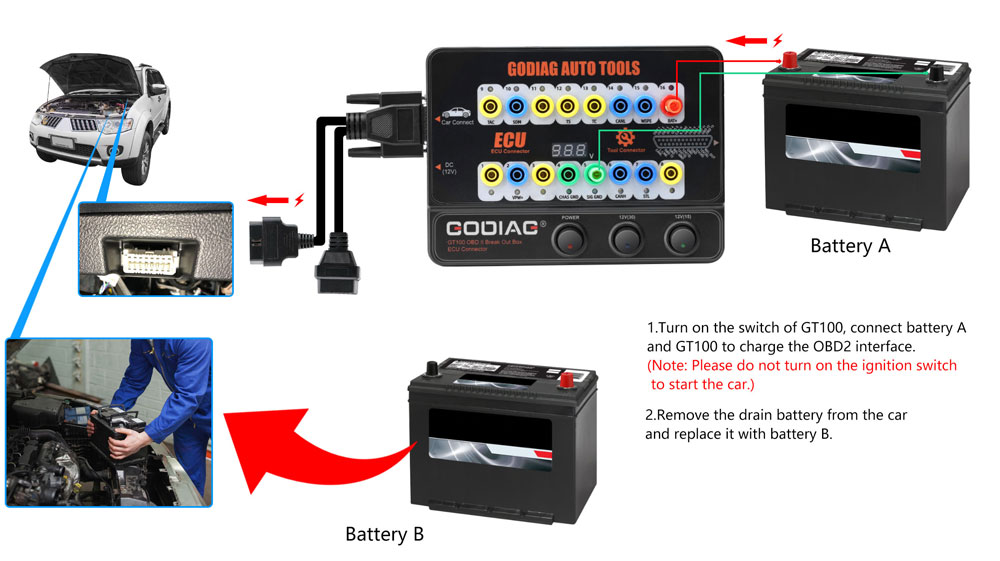
1) Prepare battery A to supply power by connecting to No. 16 / 4 / 5 holes of Godiag GT100 & to the OBD2 diagnostic interface of the car.
[Notice 1. Turn on the power switch of Godiag GT100. 2. Don’t turn on the ignition switch, don’t start the car]
2) Then replace the brand-new battery B with the used battery in the car, which will ensure that the car has fully power to prevent data loss and audio lock-up or the malfunction due to lack of power to the ECU control module.
Out of stock
ODIAG GT100 Functions in Detail
– By connecting the vehicle and diagnostic tool via OBDII, Godiag GT100’s LED will indicate whether the OBDII diagnostic interface has a good communication with the car
– Monitor the voltage of vehicle OBDII interface and display it in real time. If it is less than 11V, please stop the diagnosis and programming to avoid the vehicle being unable to start/data loss/module locked.
Indicator Meaning:
| 1. Manufacturer custom 2. SJE1850 wire 3. Manufacturer custom 4. Power grounding 5. Signal grounding 6. SAEJ2284《CAN》high 7. ISO9141-2&iso, DIS4230-4K wire 8. Manufacturer custom |
9. Manufacturer custom 10. SJE1850 wire《bus-> 11. Manufacturer custom 12. Manufacturer custom 13. Manufacturer custom 14. SAEJ2284《CAN》low 15. ISO9141-2 & ISO/DIS 4230-4L wire 16. Car battery positive |
1. OBDII Protocol Detector & communication detection
1) Connect GODIAG GT100 to the OBDII diagnostic port of the car.
2) When the device displays the voltage, turn on the power switch of GODIAG GT100.
3) Then connect to the diagnostic tool, when the tool is communicating with the car, the LED indicator of corresponding protocol will light up or flash. ( If the CAN protocol is detected, it will have the maximum brightness. When the communication is successful, the corresponding CAN-H and CAN-L will dim or twinkling weakly)

2. ECU connection: single module connection
GODIAG GT100, connected to a single ECU module, is convenient for a user to do the single-module diagnosis and programming.
1) Connect the ECU with the color jumpers. (If the ECU is CAN protocol, please check whether you will need to connect a 120 ohm resistor.)
2) The Godiag GT100 can be powered by connecting to the OBDII diagnostic interface of car, or by an AC power adapter.
3) To diagnose and program for a single ECU by connecting the diagnostic tool or ECU programmer.

3. Banana plug extension connection:
Extend the car’s OBDII 16pin interface to tell you whether the OBDII interface connection is good or not, which is convenient for the test of OBDII interface voltage waveform.

4. Convert OBD1 diagnostic interface to the standard OBD2
Use the connector to convert the OBD1 interface into obd2 interface according to the diagnostic interface communication protocol.

6. Used as the extension cables: The space of the diagnostic interface location is too narrow to connect to the diagnostic tool, or the user find that the diagnostic cable is not long enough during maintenance. It can be extended by 1.2 meters.

7. Able to power the car when replacing the used battery.
1) Prepare battery A to supply power by connecting to No. 16 / 4 / 5 holes of Godiag GT100 & to the OBD2 diagnostic interface of the car.
[Notice 1. Turn on the power switch of Godiag GT100. 2. Don’t turn on the ignition switch, don’t start the car]
2) Then replace the brand-new battery B with the used battery in the car, which will ensure that the car has fully power to prevent data loss and audio lock-up or the malfunction due to lack of power to the ECU control module.


You must be logged in to post a review.


MAECENAS IACULIS
Vestibulum curae torquent diam diam commodo parturient penatibus nunc dui adipiscing convallis bulum parturient suspendisse parturient a.Parturient in parturient scelerisque nibh lectus quam a natoque adipiscing a vestibulum hendrerit et pharetra fames nunc natoque dui.
ADIPISCING CONVALLIS BULUM
- Vestibulum penatibus nunc dui adipiscing convallis bulum parturient suspendisse.
- Abitur parturient praesent lectus quam a natoque adipiscing a vestibulum hendre.
- Diam parturient dictumst parturient scelerisque nibh lectus.
Scelerisque adipiscing bibendum sem vestibulum et in a a a purus lectus faucibus lobortis tincidunt purus lectus nisl class eros.Condimentum a et ullamcorper dictumst mus et tristique elementum nam inceptos hac parturient scelerisque vestibulum amet elit ut volutpat.
Related products

Phoneix Elite
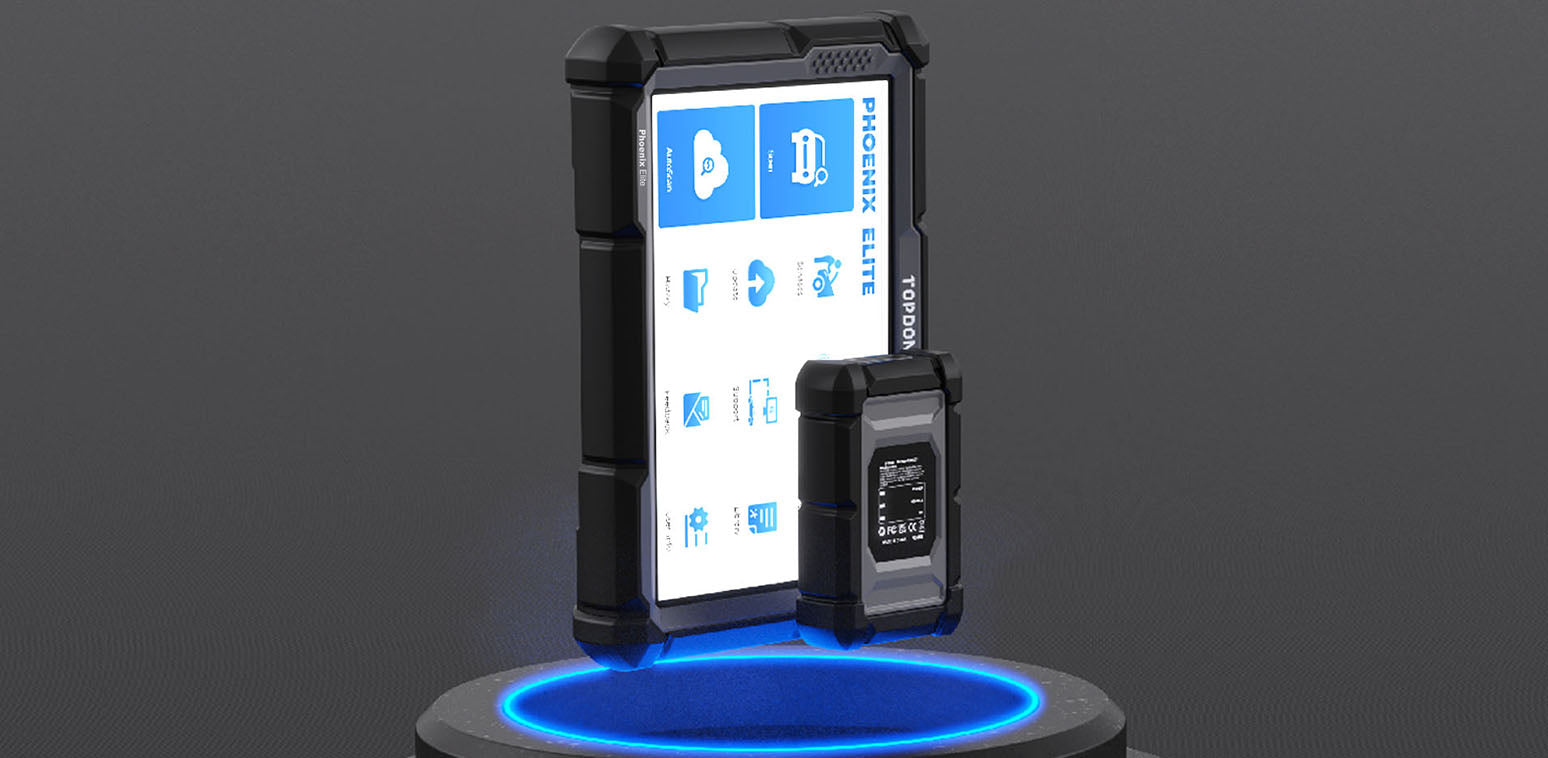
CONNECT TO THE NEWEST VEHICLES
Vehicle communication is enhanced with most of the latest communication protocols. The Phoenix Elite comes equipped with wireless VCI and CAN-FD capabilities.
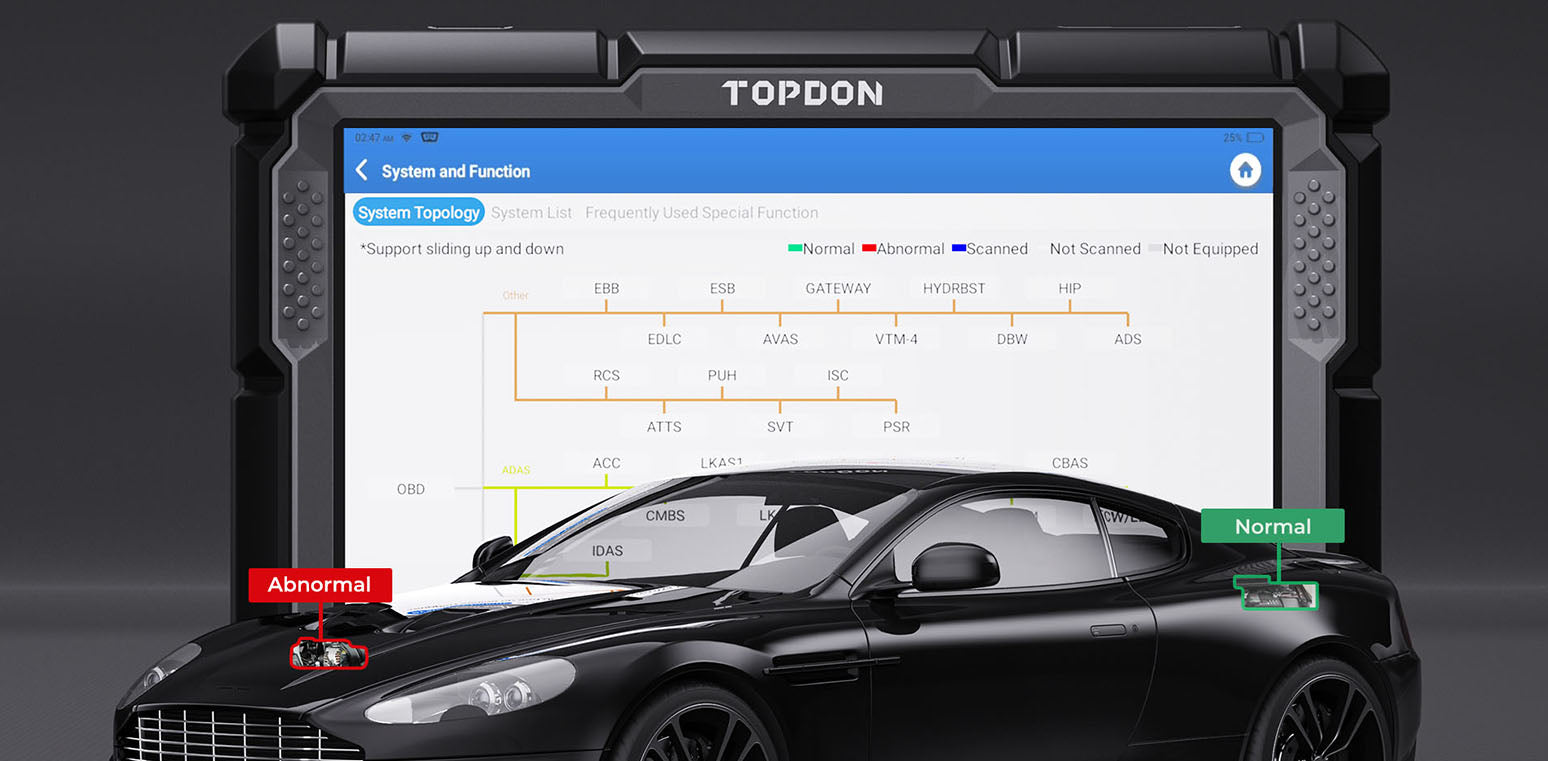
ALL DATA ON ONE SCREEN
-Topology mapping displays related vehicle systems and CAN network.
-Diagnose communication issues instantly.
-Color-coded mapping of each module’s communication status.
-Offer active tests, special functions, coding, initialization, and memory resets.
GUIDED FUNCTIONS FOR VAG VEHICLES
Step-by-step guided diagnostics procedures based on code for VW and Audi Vehicles.
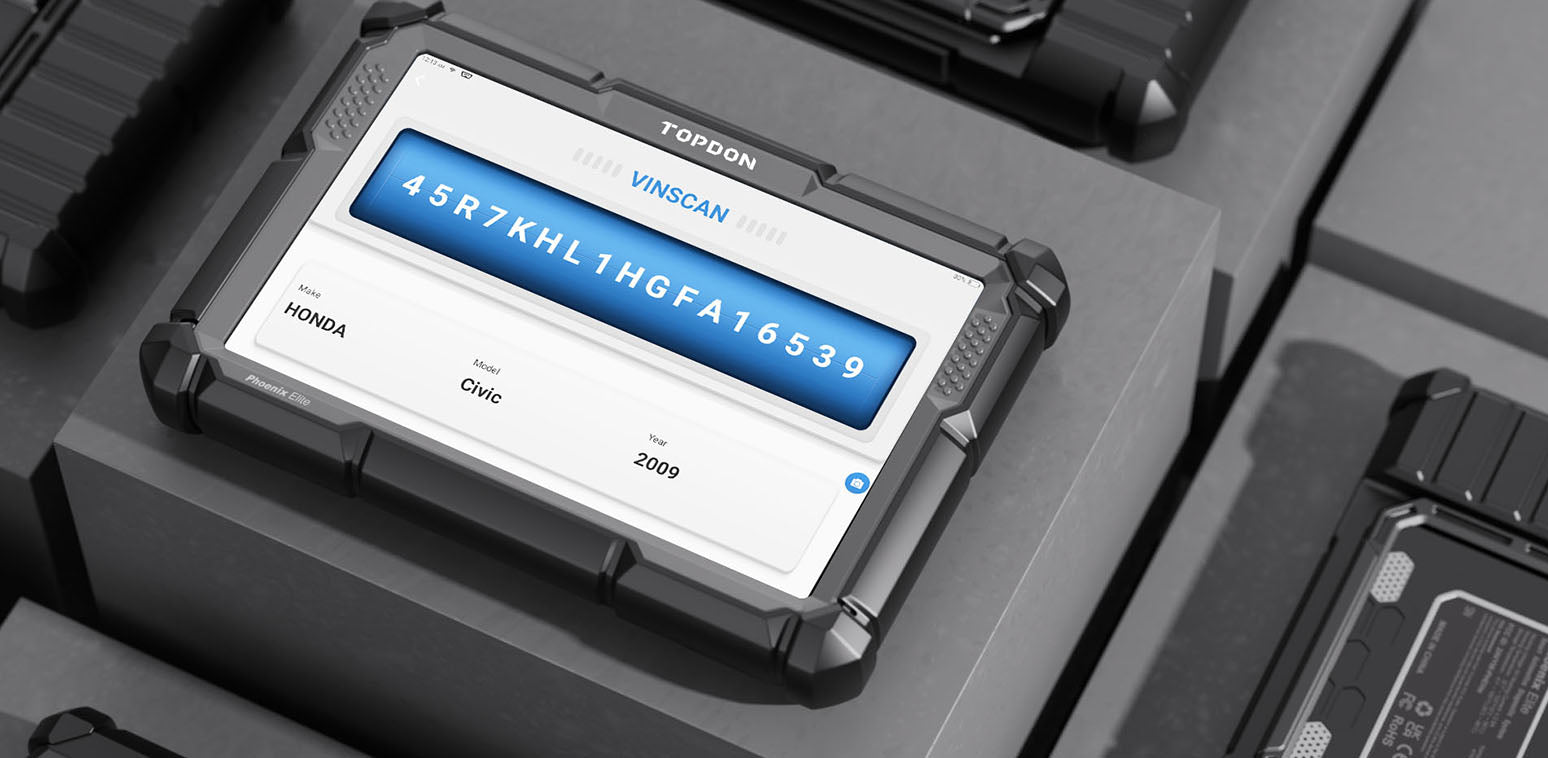
VEHICLE AUTO VIN AND AUTODETECT
The Phoenix Elite automatically captures the vehicle’s VIN number and finds all relevant information about the vehicle. Use this feature to save time and prevent mistakes.
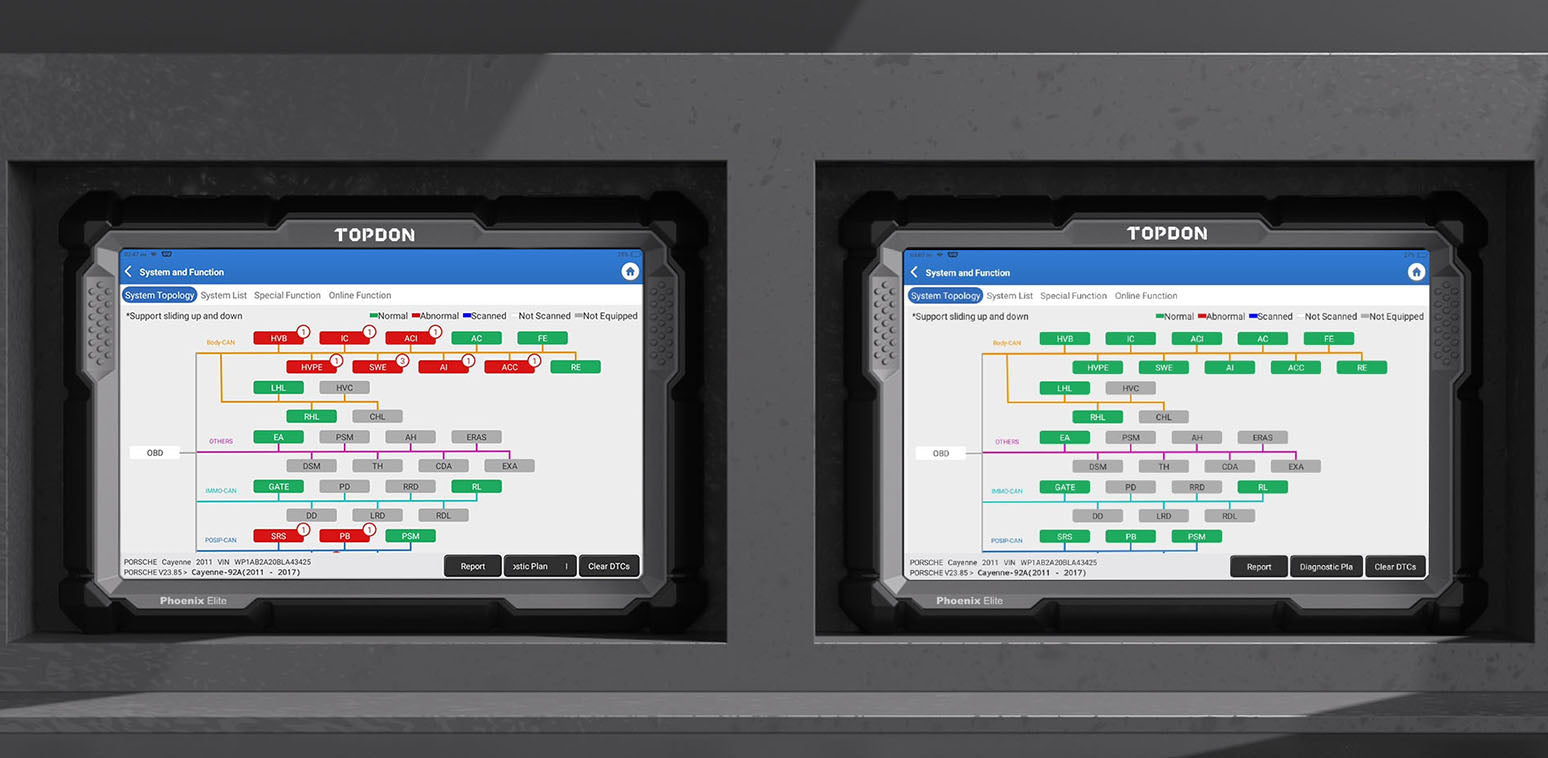
PRE-SCAN AND POST-SCAN REPORTING
The Pre-Scan and Post-Scan features allow the technician the ability to record the codes prior to repair. This will enable copies to be given to insurance companies and customers for repair approval. When the repairs are completed, the Post-Scan report can be recorded showing all codes are clear, showing off the vehicle's clean bill of health.
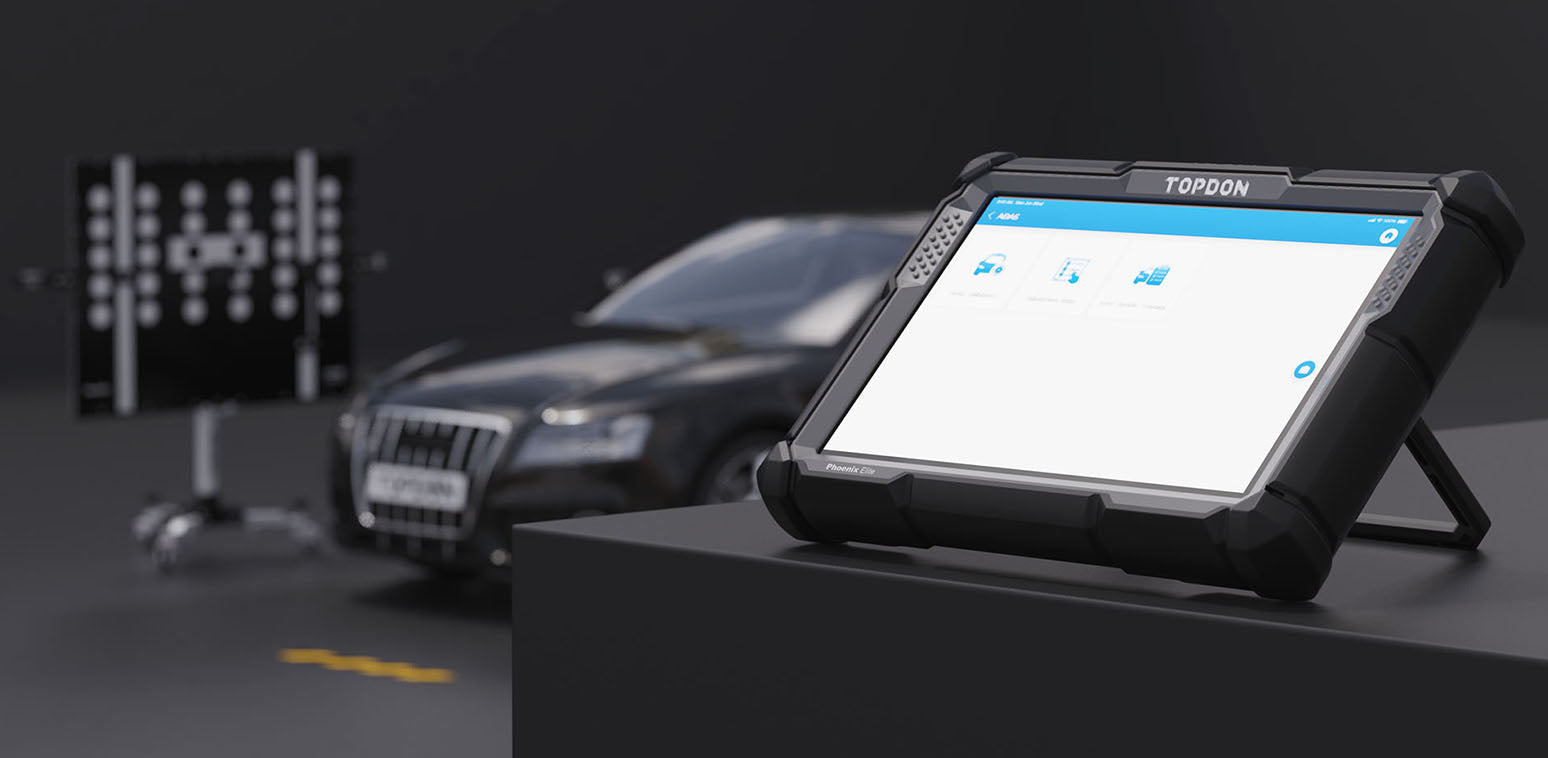
EXPAND YOUR CAPABILITIES WITH ADAS CALIBRATION
Stepping beyond diagnostics, the Phoenix Elite introduces ADAS capabilities to auto shops. Download the ADAS upgrades and pair with a Phoenix ADAS system to turn your Phoenix Elite into a calibration station, creating a new revenue stream for auto shops.

MaxiCheck MX900TS جهاز تشخيص متقدم
MaxiCheck MX900TS
AUTOMOTIVE DIAGNOSIS SYSTEM
The new MaxiCheck MX900-TS delivers complete diagnostic functions and comprehensive TPMS solutions for all the covered makes and models. This results in an extremely purposeful and creative tool. Easy and intuitive navigation on the 8-inch touchscreen allows you to fast find what you need. The MaxiVCI V150 for wireless communication with the test vehicle and its advanced wireless technologies make it truly portable and Internet accessible.
Extensive vehicle coverage for U.S., Asian, and European vehicle makes
· Exceptional OE-Level system for all electronic systems
· Excellent functions for reading codes, live data, ECU information and performing active test, adapation, and matching, etc.
· Features DoIP and CAN FD protocols
· Smart AutoVIN technology for identifying vehicles easily
· Automatic system and software updates with real-time push notifications through the Internet
· Instant remote control tech support anytime and anywhere
· Advanced TPMS diagnostics with DTC description
· TPMS status, one step for complete TPMS health check
· Activate all known TPMS sensors
· Program AUTEL MX-Sensor
· Comprehensive OBD relearn coverage
· On-screen relearn procedure
· One-stop multitasking designed for ideal management of workshop operations to keep
all data files, customer info, and vehicle records well organized
· Supports Pre & Post Scan
جهاز Autel MaxiCheck MX900TS هو جهاز تشخيص متقدم مصمم لتقديم حلول شاملة للفنيين الذين يحتاجون إلى تشخيص المركبات وخدمات الصيانة بشكل موثوق. إليك بعض الميزات والخصائص الأساسية:
-
تغطية تشخيصية واسعة: يدعم MX900TS تشخيص مجموعة واسعة من السيارات، مما يتيح للفنيين الوصول إلى أنظمة متعددة في السيارة مثل المحرك، وناقل الحركة، ونظام الفرامل المانعة للانغلاق (ABS)، ونظام الوسائد الهوائية. هذه التغطية الواسعة تجعله مناسباً لمحترفي السيارات الذين يعملون على ماركات مختلفة من السيارات.
-
نظام مراقبة ضغط الإطارات (TPMS): من أبرز مميزات MX900TS هي قدرته المتكاملة على التعامل مع نظام TPMS. يتيح للمستخدمين تنشيط وقراءة وإعادة برمجة حساسات TPMS، وهي أداة مهمة لضمان سلامة الإطارات وأدائها.
-
وظائف الصيانة والخدمات: يحتوي الجهاز على خيارات متعددة للصيانة مثل إعادة ضبط الزيت، EPB، SAS، DPF، و BMS. هذه الوظائف تساعد الفنيين على القيام بمهام الصيانة بكفاءة، مما يوفر الوقت ويقلل من الحاجة لأجهزة إضافية.
-
واجهة مستخدم بديهية: يتميز MX900TS بواجهة مستخدم سهلة الاستخدام، مع رموز واضحة وتصميم يسهل التنقل بين خيارات التشخيص والخدمات. الشاشة التي تعمل باللمس تضيف تجربة مريحة، حيث تتيح الوصول السريع إلى الأدوات والتطبيقات الضرورية.
-
واجهة اتصال لاسلكية (VCI): يأتي الجهاز مع واجهة VCI لاسلكية، مما يسمح للفنيين بالاتصال بالسيارة لاسلكيًا، وهذا يضيف مرونة وراحة، حيث يلغي الحاجة للاتصال المادي أثناء التشخيص والتحديثات.
-
التحديثات والدعم: تقدم Autel تحديثات برمجية بانتظام للحفاظ على تحديث الجهاز بآخر التقنيات والتغطيات التشخيصية. هذا يضمن أن MX900TS يبقى متوافقًا مع أحدث موديلات السيارات وتطورات التكنولوجيا في عالم السيارات.
-
تصميم مدمج وقوي: يتميز MX900TS بتصميم قوي يتحمل ظروف الورش، ويحميه من الصدمات والسقوط البسيط. حجمه المدمج يجعله سهل الحمل والاستخدام.
يعد جهاز MaxiCheck MX900TS مثاليًا للورش الفنية ومحترفي السيارات الذين يبحثون عن أداة تشخيصية عالية الأداء ومتعددة الاستخدامات، مع ميزات متقدمة خاصة بنظام TPMS ووظائف الصيانة.


MPVI 4
BUILT FOR ENTHUSIASTS AND PROFESSIONALS –
Introducing MPVI3 by HP Tuners, the fastest and most sophisticated OBDII interface device to date. Now standard with Pro Feature Set (PROLINK+ cable sold separately).
BIGGER, BETTER, FASTER.
Pro is the new standard with MPVI3. Take advantage of Pro Feature Set capabilities like standalone data logging and PROLINK+ compatibility (sold separately) already built into your new device. MPVI3 redefines the limits of speed and control with faster standalone data logging and 2X the storage capacity compared to the previous generation. Log more runs (faster) and store more calibrations on your MPVI3, all with the convenience of eliminating your laptop from the equation.


But don’t be fooled, MPVI3 continues the legacy of its predecessor with features like Bluetooth 5.0, an M8 motorsports-grade screw-on connector, RGB LEDs, and USB-C connectivity (4MB/s).


FCA to Access SGW Module
A firewall of sorts, the SGW blocks unauthorized access and manipulation of vehicle networks and vital systems. FCA says the SGW was developed not to restrict access to diagnostic data but rather to restrict “the ability of non-registered and non-authenticated users to perform intrusive diagnostics such as bi-directional controls.” Beyond the prevention of bi-directional capability, which include calibrations, relearns and actuations, even the simple act of clearing a code is denied.
Autel tablet users will be able to gain access to the SGW module, and perform previously restricted actions, by registering with AutoAuth, an authentication service. Shops can register through AutoAuth’s Internet-based registration portal for $50 a year. Up to six users can register under this initial fee, with additional users able to register for an additional nominal fee. The next step is for the shop to register its Autel tablets, up to 100 tools, on the site. Starting June 1, 2020, Autel will “push” the software to all North American market tablets with active software subscriptions. Users with tablets out of subscription, can purchase a Total Care Program software and warranty renewal through their authorized Autel dealer.


Reviews
There are no reviews yet.